
Contract Submission
Once you have submitted your initial or renewal application, you may upload new contracts received throughout the year by following the instructions below.
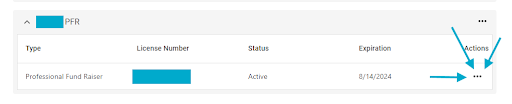
1. Once on your dashboard page scroll down the dashboard to your Professional Fundraiser or Professional Fundraising Consultant Registration. The page looks like this:

2. Select the three dots on the right side of the registration.
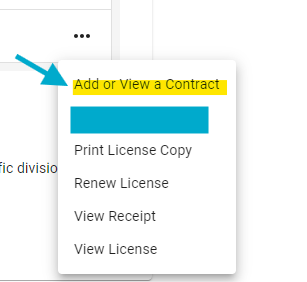
3. Select “Add or View a Contract”
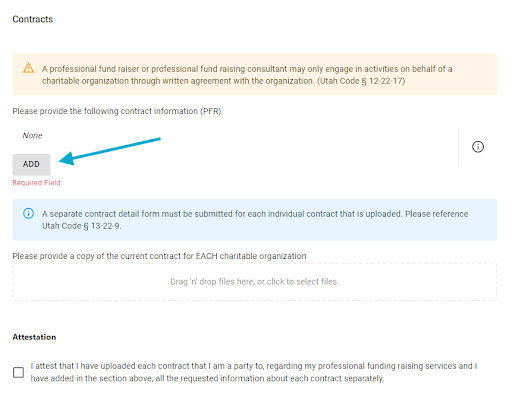
4. Once you have clicked on “Add or View a Contract” it will take you to this page, please click “ADD".
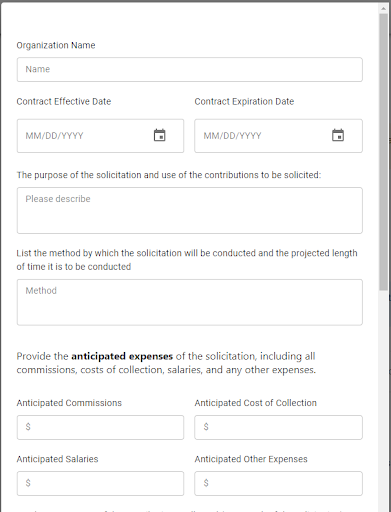
5. Once you have clicked on “ADD” this will open the contract detail page, please fill it out completely.
6. After filling out the details for the contract you will then upload a copy of the current contract in this box and mark the attestation:

7. Once completed click “FINISH” then you will click “SUBMIT” on the final page.


